Blue Monkey Powerpoint Level And GPO Cut Out Tool
The Blue Monkey is a practical installation tool designed to make fitting C-brackets for power outlets and light switches faster, easier, and more accurate. Ideal for electricians and installers, this smart stencil helps achieve clean, professional cut-outs with minimal effort.
Featuring built-in vertical and horizontal level indicators along with a clear centre marking guide, the Blue Monkey helps ensure accurate positioning before cutting into plasterboard. Whether you're working on residential fit-outs or commercial installations, it’s a handy addition to any toolbox.
Designed to deliver fast, clean, and consistent results, the Blue Monkey template simplifies the marking process and helps reduce installation time on site.
Features
- Quick and accurate C-bracket marking template
- Built-in vertical and horizontal level indication
- Clear centre point alignment guide
- Helps achieve neat and professional cut-outs
- Suitable for power outlets and light switch installations
How To Use
- Mark the desired centre point for the C-bracket location.
- Check the wall cavity for studs, brackets, or cables using a suitable stud finder.
- Align the Blue Monkey template with the marked centre point.
- Ensure the template is level before tracing the outline.
- Cut along the marked outline using a wallboard saw.
- Insert the C-bracket into the cut-out.
- Complete the electrical fit-off installation.
Product Information
Product Information
Shipping & Returns
Shipping & Returns
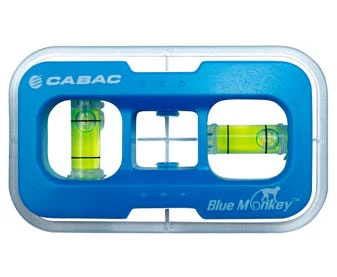
Blue Monkey Powerpoint Level And GPO Cut Out Tool
Blue Monkey Powerpoint Level And GPO Cut Out Tool
The Blue Monkey is a practical installation tool designed to make fitting C-brackets for power outlets and light switches faster, easier, and more accurate. Ideal for electricians and installers, this smart stencil helps achieve clean, professional cut-outs with minimal effort.
Featuring built-in vertical and horizontal level indicators along with a clear centre marking guide, the Blue Monkey helps ensure accurate positioning before cutting into plasterboard. Whether you're working on residential fit-outs or commercial installations, it’s a handy addition to any toolbox.
Designed to deliver fast, clean, and consistent results, the Blue Monkey template simplifies the marking process and helps reduce installation time on site.
Features
- Quick and accurate C-bracket marking template
- Built-in vertical and horizontal level indication
- Clear centre point alignment guide
- Helps achieve neat and professional cut-outs
- Suitable for power outlets and light switch installations
How To Use
- Mark the desired centre point for the C-bracket location.
- Check the wall cavity for studs, brackets, or cables using a suitable stud finder.
- Align the Blue Monkey template with the marked centre point.
- Ensure the template is level before tracing the outline.
- Cut along the marked outline using a wallboard saw.
- Insert the C-bracket into the cut-out.
- Complete the electrical fit-off installation.
Original: $16.84
-65%$16.84
$5.89Product Information
Product Information
Shipping & Returns
Shipping & Returns
Description
The Blue Monkey is a practical installation tool designed to make fitting C-brackets for power outlets and light switches faster, easier, and more accurate. Ideal for electricians and installers, this smart stencil helps achieve clean, professional cut-outs with minimal effort.
Featuring built-in vertical and horizontal level indicators along with a clear centre marking guide, the Blue Monkey helps ensure accurate positioning before cutting into plasterboard. Whether you're working on residential fit-outs or commercial installations, it’s a handy addition to any toolbox.
Designed to deliver fast, clean, and consistent results, the Blue Monkey template simplifies the marking process and helps reduce installation time on site.
Features
- Quick and accurate C-bracket marking template
- Built-in vertical and horizontal level indication
- Clear centre point alignment guide
- Helps achieve neat and professional cut-outs
- Suitable for power outlets and light switch installations
How To Use
- Mark the desired centre point for the C-bracket location.
- Check the wall cavity for studs, brackets, or cables using a suitable stud finder.
- Align the Blue Monkey template with the marked centre point.
- Ensure the template is level before tracing the outline.
- Cut along the marked outline using a wallboard saw.
- Insert the C-bracket into the cut-out.
- Complete the electrical fit-off installation.